1.
Scope
1.1
Operation and Maintenance Plan Identification
The
Operation and Maintenance (O&M) Plan provides <defunct>.com with the
policies and procedures for the managing company equipment and systems. The control, maintenance and execution of
activities documented herein are under the responsibility of <defunct>’s
Operations Group (OG). Identification of
responsibilities and sequences of major activities related to the managing
company assets are established by this document.
1.2
Objectives
Through policy declaration, this document
specifies the commitment to managing O&M processes for all <defunct>
projects. OG personnel shall execute
the procedures defined in this document to maintain consistent and approved
actions.
1.3
Internet
Website Overview
The
<defunct>.com system is
designed to be an Internet Trading HUB.
This Trading HUB will provide a forum for buyers and sellers of metal
working machine tools to trade used equipment, order third party ancillary
support, and learn about the Industry in general.
The
components that make up the <defunct>.com system will be designed
for:
Ø High information throughput, rapid network response,
Ø Secure transactions,
Ø Ease of use and functionality using a browser based interface
Ø Integration with third party software and communication interfaces,
Ø A high degree of flexibility in administration of configuration of the system.
The
website application is predominantly comprised using Commercial off the Shelf
Software (COTS) developed by and Independent Software Vendor (ISV). Object oriented middleware (both custom and
commercial) and fast network response times will be instituted. Scalability, in the form of component TCP/IP
(WWW) services installed into a UNIX server environment, will be practiced.
The website is the primary mode of commerce
and revenue. It is co-located at a
remote site with connections to our business office. The co-location site hosts our hardware,
network, firewalls, and application software.
The following areas shall fall under O&M management.
1.3.1
Application
Software
The
auction application, website monitor, Enterprise Resource Planning (ERP)
software and Customer Relationship Management (CRM) software shall be
managed.
1.3.2
Host
Machines
Hardware
servers are comprised of Sun, Dell and Compaq servers. These are networked to the Internet to form
our website. We shall manage backup and recovery systems within this procedure.
1.3.3
Network
The
Ethernet LAN, routers, switches and hubs comprising the physical connection
between host machines, firewalls and private networks shall be managed. We shall assess our security measures against
attack, monitor authorization and authentication, and manage failure recovery.
1.3.4
Internet
Gateway
This is comprised of our Internet Service
Provider’s (ISP) domain service, access to tier-one Internet and both
availability and performance of our services to the North American Internet
users.
1.3.5
Communication
Channels
Our communications channels consist of help
and FAQ pages, customer self-service pages, email, chat and telephone
communications between our website, our outsourced customer service site
(operated by service.com) and our business site. We shall monitor, control and manage each
channel.
1.4
Document Overview
This
document will define management policies and procedures relevant to operating
all company assets. This information
will be broken into the following areas.
Ø System Design – hardware and software components
Ø Policies – responsibilities, commitment to perform and organizational philosophy
Ø Fault management – surveillance and control, trouble report handling, work order handling and escalation procedures
Ø Configuration management – change requests and configuration control
Ø Performance management – performance measurement, monitor service quality trends, supply of statistical information as a basis for expansion
Ø Spare parts maintenance – availability of spare parts
Ø Field maintenance – corrective and preventative maintenance
Ø Diagrams – network details, tables and report templates
2.
Definitions
The following definitions apply to this
document:
TBD
The following acronyms apply to this
document:
|
Acronym |
Meaning |
|
CPU |
Central
Processing Unit |
|
CRM |
Customer
Relationship Management |
|
CSC |
Computer
Software Component |
|
CSU |
Computer
Software Unit |
|
ERP |
|
|
HW |
Hardware |
|
I/F |
Interface |
|
ISP |
Internet Service
Provider |
|
OG |
Operations
Group |
|
O&M |
Operation
and Management |
|
OMP |
Operation
and Management Plan |
|
RMA |
Reliability/Maintainability/Availability |
|
SW |
Software |
3.
System
Design
3.1
Overview
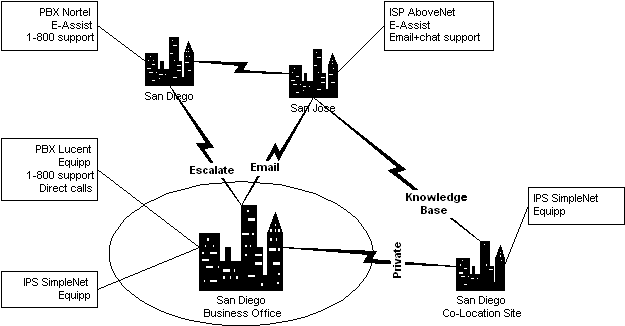
Figure 1 – Business
Sites
Our business computing machinery are grouped
into three networks: a co-location center housing the production equipment,
which is located at a network operations center (NOC) hosted by SimpleNet,
network equipment supporting business activities at our business site and
communication equipment supporting outsourced customer service activities
provided by service.com. <defunct>.com
is company domain name.
3.1.1 Network
Description
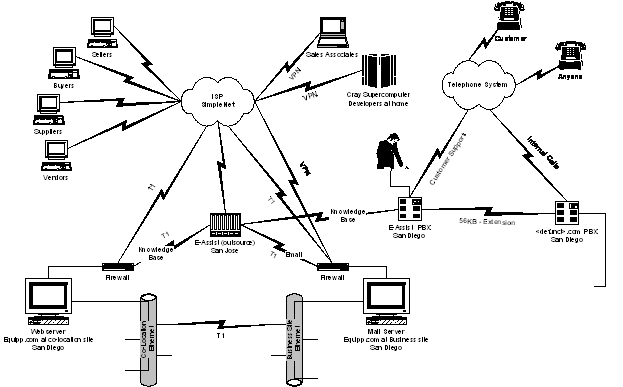
Figure 2 – Network and Phone Topology
Web servers and application servers are
networked to the Internet through a firewall.
A private connection exists between the NOC and the business site, which
allows website administration, access to the business accounting software and
web site record keeping. Another
private connection exists between the NOC and service.com, which guarantees
private communication supporting customer service activities. The business site uses a separate firewall
for its Internet access.
All computing equipment is supported by
battery-backup power supply to cover the contingency of power loss. The network is designed to provide 100
Mbit/sec data transfer rates. Appropriate
routers and switches are strategically placed to provide high security and
network bandwidth.
3.1.2 Capacity and
Volume
The operational website and associated
application software provides sufficient data storage and processing
capabilities to support the following “go-live” web traffic requirements. Scale and performance during specification of
hardware shall use a multiplier of 10 against each metric.
Ø Auction
transactions (where the purchase is consummated): 40 per day
Ø Catalog transactions (where the purchase is consummated): 400 per day
Ø Unique visits: 2,000 per day
Ø Web hits: 10,000 per day
Ø When anticipating number of bids per auction transaction, use a multiplier of 10 (i.e. 400 bids per day). Use the 10-multiplier for catalog item selection/deselecting as well (i.e. 4000 shopping cart additions or removals per day).
Ø Anticipate a skewed activity log where Monday is the highest activity day, followed by Tuesday, then Thursday, Wednesday and Friday. Anticipate almost no activity over Saturday or Sunday.
Ø We estimate weekly traffic load as follows: 35% Monday, 25% Tuesday, 15% Thursday, 10% Wednesday, 7% Friday, 7% Saturday & Sunday.
Ø
The
telephone support system provides sufficient capacity and processing
capabilities to support the following caller traffic requirements.
Ø Web
1-800 help handled by service.com: 100 per day
Ø General 1-800 information handled by service.com: 200 per day
Ø Specialized 1-800 help by our staff: 100 per day
Ø General 1-858 business communication by our staff: 1000 per day
3.2
Business Offices: Locations, Telephone Numbers,
Primary Contacts
Primary business activities are carried out
at <defunct>.com business office with address:
Ø <defunct>.com
business site
Ø <snip>
Ø
<defunct>.com
production (Internet) hardware and programmed software housed at co-location
center
Ø <defunct>.com
website at SimpleNet
Ø <snip>
3.3
Co-location Site
The co-location site is used to house the
hardware for our firewalls, web monitors, web servers, application servers,
database servers and supporting networking hardware. A NOC is used to house the co-location center’s
critical production computing devices since it provides around-the-clock
security, earthquake proofing, and special fire retardant systems.
All computing equipment co-located at the
NOC is powered on a battery-backup power supply to cover the contingency of
power loss at the NOC. The network
connecting these computing systems provides 100 Mbit/sec data transfer
rates. Appropriate routers and switches
are strategically placed to provide high security and network bandwidth. Static IP’s are used at the co-locate site to
enable the firewall to control the highest degree of security and minimize the
processing requirements of the servers.
Web servers and application servers are
networked to the Internet through a firewall.
A private connection between NOC and business site provides sufficient
bandwidth between application servers to prevent degradation. Static IP’s are assigned to computers to
enable the firewall to control the highest degree of security.
See Appendix C for Co-Location Site Network
Diagram.
3.3.1 Hardware
3.3.1.1
Switch
The required switch configuration is the
following:
·
Cisco
2912XL
3.3.1.2
Routers
The required router configuration is the
following:
·
Cisco
2610
·
CSU/DSU
3.3.1.3
Firewall
The required firewall configuration is the
following:
·
Sun
Ultra 10 Web Server
·
333
MHz processor
·
1GB
memory
·
10
GB of disk space (highly dependent on user requirements)
·
SVGA
Video card
·
Monitor
(80 MHz, 1024 x 768 screen resolution)
·
Mouse
·
Keyboard
·
UPS
(Uninterrupted Power Supply)
·
Ethernet
network adapter (10/100 NIC card)
3.3.1.4
Web Page
Monitor
The Web Monitor supports
the following functionality for our product to operate efficiently:
·
Support
10,000 web hits per day without impact to other network/Internet resources.
·
There
shall be enough free disk space to contain the UNIX operating system, database
and the web monitor software.
·
A
monitor shall attach to the server to enable system control and administration.
·
The
required web server configuration is the following:
·
Sun
Ultra 10 Web Server
·
333
MHz processor
·
1GB
memory
·
10
GB of disk space (highly dependent on user requirements)
·
SVGA
Video card
·
Monitor
(80 MHz, 1024 x 768 screen resolution)
·
Mouse
·
Keyboard
·
UPS
(Uninterrupted Power Supply)
·
Ethernet
network adapter (10/100 NIC card)
3.3.1.5
Web Page Server (phase 2)
The Web Server shall support the following functionality
for our product to operate efficiently:
·
Support
10,000 web hits per day without performance degradation to the background
network processes.
·
There
shall be enough free disk space to contain the UNIX operating system and the
web server software.
·
A
monitor shall attach to the server to enable system control and administration.
·
The
required web server configuration is the following:
·
Sun
Ultra 10 Web Server
·
333
MHz processor
·
1GB
memory
·
10
GB of disk space (highly dependent on user requirements)
·
SVGA
Video card
·
Monitor
(80 MHz, 1024 x 768 screen resolution)
·
Mouse
·
Keyboard
·
UPS
(Uninterrupted Power Supply)
·
Ethernet
network adapter (10/100 NIC card)
3.3.1.6
Disk
Array
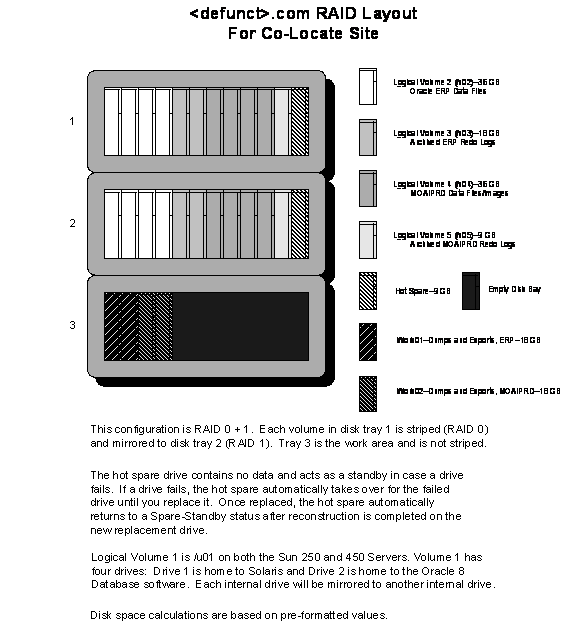
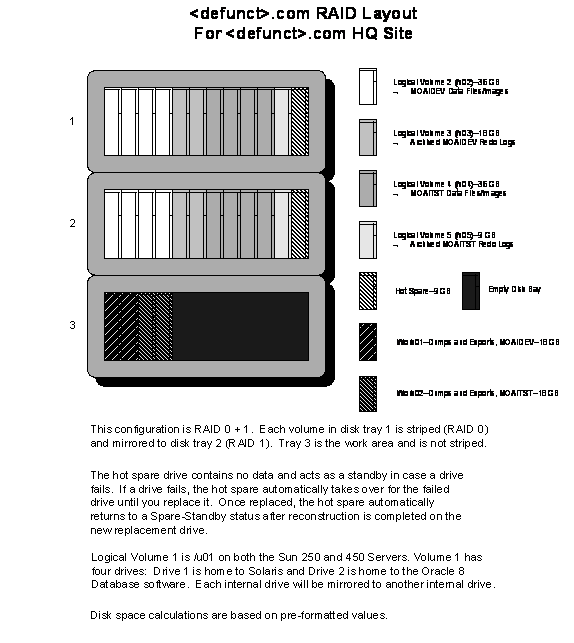
The required mirrored disk array
configuration is the following:
3.3.1.7
Tape
Backup
The required tape configuration is the
following:
·
Sun
DLT 1000
3.3.1.8
Application
Servers
Application, middleware and database server
software will execute on this high performance hardware. The server will communicate to the web
server(s) over a network. The Auction
Server shall support the following functionality for our product to operate
efficiently:
·
There
shall be enough free disk space to contain the application server software.
·
Support
JSP, Java servlets and JDBC without performance degradation to the background
network processes.
·
Support
for SSL, HTTP through firewall
·
There
shall be enough free disk space to contain the UNIX operating system, the
application database software, and Oracle Server (8.1.5).
·
The
GUI portion of administrative tools distributed with the software requires a
screen resolution of 1024 x 768 pixels (large fonts) with a minimum color depth
of 256 colors. An appropriate SVGA monitor shall be installed.
The required production server configuration
is the following:
·
Sun
Enterprise 450 application and database server
·
400
MHz processor
·
256
MB memory
·
100
GB of disk space (highly dependent on user requirements)
·
SVGA
Video card
·
Monitor
(80 MHz, 1024 x 768 screen resolution)
·
Mouse
·
Keyboard
·
UPS
(Uninterrupted Power Supply)
·
Ethernet
network adapter (10/100 NIC card)
3.3.1.9
ERP
Server
Financial accounting software will execute
on this high performance hardware. The
server will communicate between applications and the business site. The ERP Financial Accounting Server shall
support the following functionality for our product to operate efficiently:
·
There
shall be enough free disk space to contain the financial application software.
·
Support
ODBC and JDBC without performance degradation to the background network
processes.
·
There
shall be enough free disk space to contain the UNIX operating system, the
financial accounting software, Oracle Server (8.0.5), and the financial
accounting database.
·
The
GUI portion of administrative tools distributed with the software requires a
screen resolution of 1024 x 768 pixels (large fonts) with a minimum color depth
of 256 colors. An appropriate SVGA monitor shall be installed.
The required Financials Database server
configuration is the following:
·
Sun
Enterprise 250 application and database server
·
300
MHz processor
·
1GB
memory
·
100
GB of disk space (highly dependent on user requirements)
·
SVGA
Video card
·
Monitor
(80 MHz, 1024 x 768 screen resolution)
·
Mouse
·
Keyboard
·
UPS
(Uninterrupted Power Supply)
·
Ethernet
network adapter (10/100 NIC card)
3.3.1.10
CRM
Application Server
Customer Relationship Management software
will execute on this high performance hardware.
The server will communicate between service.com outsource company and
the co-location site. The CRM Server
shall support the following functionality for our product to operate
efficiently:
·
There
shall be enough free disk space to contain the CRM application software.
·
Support
ODBC without performance degradation to the background network processes.
·
There
shall be enough free disk space to contain the Windows NT server operating
system, the CRM software, MS SQLServer7.0), and the CRM database.
·
The
GUI portion of administrative tools distributed with the software requires a
screen resolution of 1024 x 768 pixels (large fonts) with a minimum color depth
of 256 colors. An appropriate SVGA monitor shall be installed.
The required CRM server configuration is the
following:
·
Dell
xj500 server
·
Dual
300 MHz processor
·
1GB
memory
·
100
GB of disk space (highly dependent on user requirements)
·
SVGA
Video card
·
Monitor
(80 MHz, 1024 x 768 screen resolution)
·
Mouse
·
Keyboard
·
UPS
(Uninterrupted Power Supply)
·
Ethernet
network adapter (10/100 NIC card)
3.3.1.11
CRM
E-Mail Server
Customer Relationship Management email
software will execute on this high performance hardware. The server will communicate between
service.com outsource company and the co-location site. The CRM Server shall support the following
functionality for our product to operate efficiently:
·
There
shall be enough free disk space to contain the CRM email application software.
·
Support
ODBC without performance degradation to the background network processes.
·
There
shall be enough free disk space to contain the Windows NT server operating
system, the CRM email software, MS SQL (5.0), and the email database.
·
The
GUI portion of administrative tools distributed with the software requires a
screen resolution of 1024 x 768 pixels (large fonts) with a minimum color depth
of 256 colors. An appropriate SVGA monitor shall be installed.
The required CRM email server configuration
is the following:
·
Dell
xj500 server
·
300
MHz processor
·
256
MB memory
·
20
GB of disk space (highly dependent on user requirements)
·
SVGA
Video card
·
Monitor
(80 MHz, 1024 x 768 screen resolution)
·
Mouse
·
Keyboard
·
UPS
(Uninterrupted Power Supply)
·
Ethernet
network adapter (10/100 NIC card)
3.3.2 Software
3.3.2.1
Database
3.3.2.1.1
Overview
There are five Oracle database instances and
one Microsoft SQL Server at the co-location site. Three of the Oracle instances support the
Oracle Financial Applications, run on the E-250, and use Oracle8 software. One instance is used by Moai Live Exchange,
which runs on the E-450, and uses Oracle8i software, and the fifth instance is
used by the Accrue Insight collection & reporting tool, currently runs on
the E-450, and uses Oracle8i software. The single Microsoft SQL Server instance
is used by the Octane Customer Relationship Management (CRM) software, runs on
a dedicated NT dual processor machine, and uses the version 7 Microsoft
products.
3.3.2.1.2
Installation
<xxx
Documentation on issues will be added here>
3.3.2.1.3
Patches/Releases
We are currently running 8.1.5.1 on Leai and
Tatooine. Skywalker has not had the
current patch installed. There is
already a .2 patch available for special circumstances, and a .3 promised, as
well as a new release, 8.1.6 (also referred to as 8i Second Release).
The 8.1.5.1 patch fixed several Recovery
Manager and interMedia context indexes (sic) problems.
3.3.2.1.4
RAID
See
Appendix B for description of RAID.
3.3.2.2
Firewall
Multiple servers handle web page creation
via the connection to the Internet through a firewall. The firewall application is the only
application running on the firewall servers.
We have chosen Checkpoint’s Firewall-1 as the application of
choice. It is configured to allow only
HTTP and HTTPS protocols passage to our web server(s). The firewall is also configured to announce
the IP of our web server to the Internet.
·
Operating
System: Sun Solaris version 2.6
·
<snip>
3.3.2.3
Web
Page Monitor
Our network analysis software, Accrue
Insight, uses the Oracle8i database software.
Two extra cost Oracle8i options are required for this installation: the
partitioning option, and the parallel query option. Accrue states the latter as being the
"bitmapped index" option; however, there is no such option. Bitmapped indices are part of the parallel
query option.
The files from the Accrue
"collector" are stored in naboo::/insight/var/log. There are two files here every hour of every
day. The files for the current hour and
the previous hour are not compressed. Files
prior to these are compressed in the .gz format. While these files could be uncompressed and
edited, it's more likely that the database would be cleared and the
"transformer" would be used to filter unwanted records. Insight operates in a batch mode. Files are loaded into the database at 9:30 PM
and 1:30 AM. The 9:30 load is referred
to as the "mini load", and the 1:30 load as the "nightly
load". The nightly load also does
reports. These loads are done from two
entries in the "goldmine" user account crontab file.
<xxx insert crontab –l output here>
After the nightly load, the files are moved
from naboo::/insight/var/log to naboo::/insight/var/archive. The /insight/var mount point will be moved
onto another file system.
<xxx
insert name of file system here>
Accrue documentation recommends that you run
Oracle in "noarchivelogmode".
This recommendation was not in the "quick start" sheet that
was read prior to the installation, so
we were initially running in archive log mode; however, the reasons for not
running in archive log mode where only protective, and Accrue agrees that the
recommendation was based on "keeping it simple". We monitor our systems six times a day to
monitor the disk utilization.
Without archive log mode we cannot do
"hot backups", implement Oracle Recovery Manager (R*Man), or do point
in time recovery. There is a performance
hit for running in this mode however.
The instance will run faster in noarchivelogmode, and will consume less
disk space. It will have to be down
periodically for cold backups (i.e., scheduled maintenance), or be captured in
a logical backup (schema export). Both a
little more trouble than hot backups, or using the R*man/Veritas libraries to
operate the tape drive directly. In the
event we have a database failure, we may want to just rebuild the schema and
reload the data from the collector files -- depending on size and duration of
those stored collector files.
The steps required to rebuild are documented
in Appendix D: Steps to Rebuild the Accrue Oracle Database Schema.
Because all data resides in the log and
archive directories, the archive log mode in the Accrue Oracle instance has
been turned off.
3.3.2.4
Web
Page Server (phase 2)
·
Operating
System: Sun Solaris version 2.6
·
<snip>
3.3.2.5
Application
Server 1
Our auction software, Moai Live Exchange,
uses the Oracle8i database software. While
the interMedia component (context indexes) is not an extra cost option, it is a
product, which was developed by another team of developers, and as a result, it
is not as “robust” as some of the other Oracle components. There are tricks to the installation and
operation, which are described in the following sections (4.3.2.5.1 through
4.3.2.5.4).
The Application Server 1 configuration
follows:
·
Operating
System: Sun Solaris version 2.6
·
<snip>
3.3.2.5.1
Installation
When doing a fresh install, including
Oracle8i libraries, into a new “ORACLE_HOME” structure, if you specify the
location for the Oracle “datafiles” for all components, as we do, there will be
no location for the data file associated with the “context option” (8i
“interMedia”), and the installation will fail.
The dbassist tool is not smart enough to prompt to relocate the context
data file, and not smart enough to create a directory if it doesn’t exist.
3.3.2.5.2
Start
& Stop Operations
With the exception of the Accrue instance,
all production Oracle databases are run in the archive log mode. This is the safest way to assure
point-in-time recovery. What happens
here is that every transaction is processed in an Oracle “redo log”, when the
active online redo log is filled it is switched, a new log becomes current, and
the previously filled log is archived.
With these archived logs, it is possible to restore “hot backups” to a
point-in-time before a failure occurred.
Hot backups are taken while the system is available to the user, as
compared to cold backups of operating system files, or logical backups
(exports) taken in Oracle’s “exclusive” (single user) mode. Archived redo logs cannot be applied to
restores of cold backups, or imports of export dump files.
The Accrue instance does not run in archive
log mode for reasons discussed in section 4.3.2.3 Web Page Monitor.
The sequence recommended by Oracle to
shutdown the system is as follows:
% su root
# shutdown -y -g0 -i6
If the Unix “boot”, “reboot”, or “init 6”
commands are used the database does not shutdown with the automatic shutdown
script “dbshut”. These commands are not
reading the shutdown script in the “/etc/rc0.d” directory.
Issuing the “shutdown” command executes the
scripts in the above directory.
For
the Moai and Accrue Oracle instance’s automatic startup and shutdown
configurations please see Appendix E: Production Oracle Auto Start and
Shutdown.
There
is one Unix “crontab” file on the production server (Tatooine).
The
Oracle user’s crontab file contains the following entries:
#
Compress the archive redo logs every 15 minutes
0,15,30,45
* * * * /u02/app/oraprd/dba/comparch PRD > /dev/null 2>&1
#
Perform database checks for OraLogs - D.Russell 01/2000
45
03,07,11 * * 0-6 /u01/app/oracle/scripts/database_checks.sh >/dev/null
2>&1
45
15,19,23 * * 0-6 /u01/app/oracle/scripts/database_checks.sh >/dev/null
2>&1
#
Analyze Moai Tables Daily - D.Russell 01/2000
00
04 * * 0-6 /u01/app/oracle/scripts/analyze_tables.sh >/dev/null 2>&1
#
Perform Hot Backup to Disk Daily - D.Russell 01/2000
00
02 * * 0-6 /u01/app/oracle/scripts/hot_disk.sh >/dev/null 2>&1
The
entries in this facility cause several database actions to occur at preferred
intervals. Obviously, activities such as
tape backups of file systems should occur after the completion of the Oracle
hot backups.
There
is one Unix “crontab” file on the production Web Page Monitor (Naboo). This file is located in the “Goldmine” user’s
account and contains the following information:
4 *
* * * /insight/bin/gziplogs.pl /insight/var/logs >/dev/null 2>&1
30
1 * * * /insight/bin/nightly.pl > /insight/var/status/nightly.log
2>&1
30
21 * * * /insight/bin/find_load >
/insight/var/status/find_load_cron_log 2>&1
10
* * * * /insight/bin/notify
>/insight/var/status/notify_log 2>&1
The
goldmine crontab may be discussed elsewhere; however, one of these entries,
nightly.pl, also performs the periodic Oracle table analysis which is required
for the Cost Based Optimizer (CBO) of Oracle.
3.3.2.5.3
Execution
The
method to start the context server is not automated. The files, which start the listener and
database, do not start the context server.
This is currently a manual process, which is accomplished, as follows:
$ORACLE_BASE/scripts/start_context.sh
This
process will be automated in the future.
The context server is not necessary in order to use context indexes
(sic). It is only necessary for
background processes, which re-index the fields.
While
it doesn’t seem to hurt to shutdown Oracle and/or reboot the Unix operating
system without shutting down the context server, it could corrupt indexes (sic)
if the background process was executing which required the context server. With that in mind, we have created the follow
script to shutdown the context server:
$ORACLE_BASE/scripts/stop_context.sh
If
you neglect to stop the context server and restart the machine or the database,
the context server process will stop because it is also a process within
Oracle, and it will need to be manually restarted using the procedure above.
3.3.2.5.4
Maintenance
Context
indexes (sic) rely on the Oracle cost based optimizer (CBO). Queries written for the rules based optimizer
(RBO) have a different structure. Once a
table has been “analyzed”, it is automatically queried using the CBO
technique. There is a daily crontab
entry in the Unix Oracle account to analyze the Moai tables, as follows:
#
Analyze Moai Tables Daily - D.Russell 12/1999
00
04 * * 0-6 /u01/app/oracle/scripts/analyze_tables.sh >/dev/null 2>&1
It
is not a good idea to analyze all tables routinely, and absolutely not a good
idea to analyze the “sys” and “system” data dictionary tables. In the event that tables that should not be
analyzed accidentally are analyzed, we have techniques, which will reverse the
analysis and remove the statistics.
3.3.2.5.5
Verification
The
easiest way to tell if the context server is running is to execute the
following UNIX command:
ps
–elf |grep –i ctx
A
more complicated alternative from SQL*Plus follows:
select
osuser, type, program from v$session
where
program like ‘ctxsrv%’;
This
shows you that the context server is not just a Unix process but is defined
within Oracle as being an Oracle process.
3.3.2.6
ERP
Server
Oracle
<defunct>.com
implemented the following modules of Oracle Financials: General Ledger, Accounts Receivable, Accounts
Payable, Fixed Assets, Purchasing, Inventory, and Order Entry. Three instances are maintained: Production (PRD), Test (TST), and Vision
(VIS).
The
Production instance contains the production financial records for the
company. The Test instance is for
testing both code and operational changes and enhancements. The Finance department uses the Test instance
to verify, for example, that new procedures correctly update journals, before
implementing the new procedures in Production.
It is imperative that both the PRD and TST instances be available at all
times to the Finance department. The TST
and PRD setups must be the same at all times.
The
Vision database is fully configured to showplace virtually all of Oracle’s
functionality. It is available for
investigating the impact of new transactions that are outside the current scope
of the system. As <defunct>.com
grows and enters new markets, the Vision database will be used to see how
complex transactions are configured and to understand process flows in an
environment that may be different from our current system. Vision only needs to be running at that time
when such investigations take place. At
all other times, Vision should be shut down to preserve system resources.
Each
instance has its own binaries, so that both application and database patches
can be applied first in the TST environment, and then, after successful testing
of the changes, applied to PRD. All
changes, no matter small, must be applied first to TST.
The
Oracle Financials Implementation Technical Reference is a comprehensive guide
that was written to cover the setup and configuration of the Oracle Financials
at <defunct>.com. The sections
include Oracle Support, TARs, Patches, Scripts, Physical DB Design, Veritas and
Oracle, RAID and Oracle, Technical Bulletins, Applications Sizing, an
Engagement Summary of installation and setups of all three instances, custom
printer configurations, Tuning of Oracle I/O, Documentation, Host Environments,
Error Screen Shots, Read Me Section, Moai Integration with Oracle Financials,
Tradesafe Specs, Correspondence, and Notes.
This book is always located in the bookshelf of the Database Architect.
A comprehensive
two-volume set covers the functional setup.
Volume I covers Acceptance Certificates of ERP project manager Progress
Reports, the Chart of Accounts configuration, the Flexfields setup for
<defunct>.com, Oracle contracts, FastForward Standard Fuctionality,
Training, Oracle consultants backgrounds, Schedules and Tasks, and Oracle
Reports.
Volume
II covers FastForward Financials, FastForward Inventory and Order Entry, the
Scope, Objectives and Approach of the Financials Implementation, Site Assessment,
and Process Flows.
An
additional multi-volume set of detailed setup screens for each module,
including all month end closing procedures was also prepared. These documents are located in the Finance
department, in the Accounting Manager’s bookcase.
Each
module has two types of documentation:
functional and technical, and is shared between the Finance Department
and Database Architect.
The
ERP configuration follows:
·
Operating
System: Sun Solaris version 2.6
·
<snip>
3.3.2.7 CRM Application Server
As
our out-source help facility, service.com answers first tier email, phones and
live chat requests from our homepage. In
the process, they use the Octane software which is a database based application
owned by <defunct>.com. Octane's
features include contact management, customer care, help desk, and product
(defect) tracking.
Contact management is used by service.com to collect
customer contact information when a customer chooses to not register as buyer
or seller.
<defunct>.com has created an interface between the customer records in
Octane and the customer data contained in Moai.
This modification was done in Octane's default database schema to add
one column in b_entity called c_userOID, which service.net will use to identify
if the customer is already registered in Live Exchange's database or Octane's
database. A Javascript servlet on the
Oracle/Moai side was written to do the data sync.
In
its’ next release, we will receive sales force automation and market
campaign analysis. The interfaces to other components will change with
that release, as well.
Additional
modifications have been made to the Octane database “b_octane” schema by
service.com. The script, which makes
this modification, has been loaded into Visual Source Safe (VSS), which was
also installed on the Octane server.
Because
the changes were database "alters" they do not appear numerically,
alphabetically, or logically, in sequence.
The changes are presented, as required.
The
CRM configuration follows:
·
Operating
System: Windows NT server version 4.0, SP 5
·
<snip>
3.3.2.8 CRM E-Mail Server
The
CRM E-Mail Server configuration follows:
·
Operating
System: Windows NT server version 4.0, SP 5
·
<snip>
3.4
Business
Site
The
business site is used to house the hardware for our firewalls, email,
development and test servers, workstations, print servers and supporting
networking hardware. A locked enclosure
shall house the firewall, email and print servers. A separate locked area shall house the
development and test servers. A battery
backup system shall provide 3 hours backup to all server equipment (except
workstations) housed at the site.
The
private connection between NOC and business site must provide sufficient
bandwidth between application servers to prevent degradation. For this reason, business Internet traffic
travels through the separate connection.
Switches and routers are strategically placed to enable either 10 or 100
Mbit/sec connections between servers and clients. Static IP’s are used for the servers to
maximize security and minimize dynamic allocation. Dynamic IP’s are used for all client
workstations to minimize system administration overhead.
The
business office houses the company intranet and PBX telephone switch.
Multiple
servers will handle printers, dynamic IP assignment to workstations, email and
connection to the Internet through a firewall.
All
firewall software shall be configured and monitored by approved consultants or
company personnel.
Application
development software runs on high performance servers. The applications include web page design,
database design tools, middleware application development tools, middleware
applications, web server and database server.
This development system should be considered a clean-room environment whereby the product under development has no
chance to contaminate the production environment. Connection between server and workstation is
handled through a network connection between UNIX servers and PCs using samba.
An Internet connection separated by firewall software on a server connects the
business site to the Internet.
Email
is provided by internal applications.
The firewall shall check the email addresses of all recipients for
validity prior to granting the messages passage.
We
will assign IP numbers using DHCP for workstations. We will use Windows NT Server to provide
DHCP, email, authentication and printer server functionality. This server will reside at the business site.
See
Appendix C for Business Site Network Diagram.
3.4.1
Telephone
System
The
business site houses our PBX telephone switches. The telephone system is answered
automatically by an automated software system supplied by Lucent. A directory of personnel and telephone extensions
is supplied to callers of the business telephone number (858)-638-0026.
Our
outsource customer support vendor, service.com, provides <tbd
1-800-xxx-yyyy > telephone
support for a limited amount of customer support.
3.4.2 Hardware
3.4.2.1
Switch
The
required switch configuration is the following:
·
Cisco
2912XL
3.4.2.2
Routers
The
required router configuration is the following:
·
Cisco
2610
·
CSU/DSU
3.4.2.3
Hubs
The
required hub configuration is the following:
Ø Cisco Catalyst 2924
3.4.2.4
Firewall
The
firewall server shall be supported by a battery backup system capable of
supplying power for 3 hours. The
required firewall configuration is the following:
·
Sun
Ultra 10 Web Server
·
333
MHz processor
·
1GB
memory
·
10
GB of disk space (highly dependent on user requirements)
·
SVGA
Video card
·
Monitor
(80 MHz, 1024 x 768 screen resolution)
·
Mouse
·
Keyboard
·
UPS
(Uninterrupted Power Supply)
·
Ethernet
network adapter (10/100 NIC card)
3.4.2.5
Development
System
The
development hardware exactly replicates the production equipment.
3.4.2.6
Primary
Domain Controller
The
PDC server shall be supported by a battery backup system capable of supplying
power for 3 hours. Business users will
store files upon this high performance hardware. The server shall support the following
functionality for our users to use it efficiently:
·
There
shall be enough free disk space to contain DHCP, Printer and Domain controller
software.
·
There
shall be enough free disk space to contain the Windows NT server operating
system.
·
The
GUI portion of administrative tools distributed with the software requires a
screen resolution of 1024 x 768 pixels (large fonts) with a minimum color depth
of 256 colors. An appropriate SVGA monitor shall be installed.
The
required file server configuration is the following:
·
Dell
xj500 server
·
300
MHz processor
·
1GB
memory
·
100
GB of disk space (highly dependent on user requirements)
·
SVGA
Video card
·
Monitor
(80 MHz, 1024 x 768 screen resolution)
·
Mouse
·
Keyboard
·
UPS
(Uninterrupted Power Supply)
·
Ethernet
network adapter (10/100 NIC card)
3.4.2.7
File
Server
The
file server shall be supported by a battery backup system capable of supplying
power for 3 hours. Business users will
store files upon this high performance hardware. The server shall support the following
functionality for our users to use it efficiently:
·
There
shall be enough free disk space to contain the user files.
·
There
shall be enough free disk space to contain the system files software.
·
There
shall be enough free disk space to contain the Windows NT server operating
system.
·
The
GUI portion of administrative tools distributed with the software requires a
screen resolution of 1024 x 768 pixels (large fonts) with a minimum color depth
of 256 colors. An appropriate SVGA monitor shall be installed.
The
required file server configuration is the following:
·
Dell
xj500 server
·
300
MHz processor
·
1GB
memory
·
100
GB of disk space (highly dependent on user requirements)
·
SVGA
Video card
·
Monitor
(80 MHz, 1024 x 768 screen resolution)
·
Mouse
·
Keyboard
·
UPS
(Uninterrupted Power Supply)
·
Ethernet
network adapter (10/100 NIC card)
3.4.2.8
E-Mail
Server
Business
email software will execute on this high performance hardware. The email server shall support the following
functionality to operate efficiently:
·
There
shall be enough free disk space to contain the email application software.
·
There
shall be enough free disk space to contain the Windows NT server operating
system, the email software, and the email database.
·
The
GUI portion of administrative tools distributed with the software requires a
screen resolution of 1024 x 768 pixels (large fonts) with a minimum color depth
of 256 colors. An appropriate SVGA monitor shall be installed.
The
required email server configuration is the following:
·
Dell
xj500 server
·
300
MHz processor
·
1GB
memory
·
100
GB of disk space (highly dependent on user requirements)
·
SVGA
Video card
·
Monitor
(80 MHz, 1024 x 768 screen resolution)
·
Mouse
·
Keyboard
·
UPS
(Uninterrupted Power Supply)
·
Ethernet
network adapter (10/100 NIC card)
3.4.2.9
Workstations
Business
users require hardware capable of supporting their various application
software. The workstations shall support
the following functionality to operate efficiently:
·
There
shall be enough free disk space to contain application software.
·
There
shall be enough free disk space to contain the Windows operating system.
·
The
GUI portion of the software requires a screen resolution of 1024 x 768 pixels
(large fonts) with a minimum color depth of 256 colors. An appropriate SVGA
monitor shall be installed.
The
required workstation configuration is the following:
·
Dell
xj500 computer
·
300
MHz processor
·
128
MB memory
·
10
GB of disk space (highly dependent on user requirements)
·
SVGA
Video card
·
Monitor
(80 MHz, 1024 x 768 screen resolution)
·
Mouse
·
Keyboard
·
Ethernet
network adapter (10/100 NIC card)
3.4.2.10
Printers
Business
users require printers capable of supporting their various application
software.
The
required printer configuration is the following:
·
Minolta
18 printer
·
64
MB memory
·
Ethernet
network adapter (10/100 NIC card)
3.4.3
Software
3.4.3.1
Database
Administration
Tools
Image
Server
FTP
Server
Bug
Tracker
Intranet
Server
Bulk
Load
The
BulkLoad Access database (\\Phantom\Sharedfiles\dataEntry\BulkLoader\BulkLoad.mdb) is
a Multi-User front end linked to the Shared BulkLoadData database which is the
actual staging repository.
The
QAStatus table is used to define the various steps of procedural review. As a
company's listing is massaged, the QALevel (Items.ITMQALVL) is manually
updated. The StagedItems Query will not pass an item to the MoaiBulkLoader Java
application until the ContentQA Macro determines there are no fatal errors and
the final QALevel has been reached. The final QALevel is defined by its
QAStatus.QAISOK boolean being True.
The
ContentQA Macro runs a series of Queries to check data fields and create
records in an indirection table to link a given Owner/Seller (RejectedOwners)
or Item (RejectedItems) with its’ Errors. The Errors Table has a field to indicate
whether the error is a "show-stopper" (Errors.ERRISREJ) and whether
it is "hidden" (Errors.ERRISINFO) from the list that shows up both in
the bottom part of the data entry form and in a feedback error report organized
by Seller. It also defines the error description, where the reasons WHY the
data is needed is given.
We
can add/alter the Errors Table items, add more QALevels, and create additional
Queries to help filter out those Items needing action.
When
we are bulk loading 10,000 items and the automatic email system that is set to
send emails when items have been added, we don't want to send 10,000 emails
when the bulk load process takes place.
The
real event handlers detect a tag in the offering object that identifies that
offering as being part of a bulk load process. This is done by placing some
value in a field from the offering table that the event handler will read and
bypass new listing emails.
Customer
Entry
A
temporary database was created to capture “customer data” prior to the
availability of our anticipated facilities.
The life expectancy of this database was “two weeks”. To the best of my knowledge, it is no longer
in existence service
See
“Octane” below.
Moai
(Live Exchange)
There
are currently problems associated with the Moai connections to the database.
When we resolve this it will be documented.
Oracle
Please
refer to 4.3.2.5.1 Installation, 4.3.2.5.2 Execution, 4.3.2.5.3 Maintenance,
and 4.3.2.5.4 Verification, as these sections apply to the business suite, as
well.
Octane
The
ots0 instance is currently being backed up periodically on the ots0 server and
on the DBAs workstation. No official
schedule has been established, and automated procedures have not been
implemented. Further, getting it off the
disk and onto tape needs to be done, as well.
There
is currently a difference between the instance on my machine and the one in
production. The version the DBAs machine is 7.00.623, while production is
7.00.699. The only visible configuration difference is the code page used (437
vs. 1252); but there are periodic errors with “sort order” (32 vs. 52).
Until
these differences are resolved, I do not plan to write the procedures. Getting
the right file format to restore, or to send to service, has been tedious, at
best.
3.4.3.2
Firewall
A
dedicated server shall conduct Internet traffic between our business site and
other Internet sites. The server shall run a single application, the
firewall. Again, we have chosen Checkpoint’s Firewall-1 as the application of choice. It shall be configured to allow approved VPN
and static IP addresses through. Remote
users are allowed entry through the firewall if they install certificates on
their workstations. The following is the
configuration for the firewall.
<xxx
insert configuration here>
It
shall not prevent connections initiated at the business site through, to the
Internet. This firewall shall allow FTP
and TELNET protocols through, to the business site for only approved source
static IP addresses. This firewall shall
allow SMTP protocols through, to the business site for only our domain name and
approved email addresses.
The
firewall is also configured to announce the IP of our web server to the
Internet.
·
Operating
System: Sun Solaris version 2.6
·
<snip>
3.4.3.3
Web
Page Monitor
·
Operating
System: Sun Solaris version 2.6
·
<snip>
3.4.3.4
Web
Page Server (phase 2)
·
Operating
System: Sun Solaris version 2.6
·
<snip>
3.4.3.5
Application
Server 1
·
Operating
System: Sun Solaris version 2.6
·
<snip>
3.4.3.6
Staging
Application Server 1
·
Operating
System: Sun Solaris version 2.6
·
<snip>
3.4.3.7
ERP
Server
·
Operating
System: Sun Solaris version 2.6
·
<snip>
3.4.3.8
CRM
Application Server
·
Operating
System: Windows NT server version 4.0, SP 5
·
<snip>
3.4.3.9
CRM
E-Mail Server
·
Operating
System: Windows NT server version 4.0, SP 5
·
<snip>
3.4.3.10
Primary
Domain Controller
·
Operating
System: Windows NT server version 4.0, SP 5
·
<snip>
3.4.3.11
File
Server
·
Operating
System: Windows NT server version 4.0, SP 5
·
<snip>
3.4.3.12
E-Mail
Server
·
Operating
System: Windows NT server version 4.0, SP 5
·
<snip>
3.4.3.13
Workstations
·
Operating
System: Windows NT/98
·
<snip>
3.4.3.14
Printers
·
Server
name: accounting
·
<snip>
·
Server
name: engineering
·
Server
name: marketing
·
Server
name: hp5000
3.5
Outsource
Site
---
describe
3.5.1
Hardware
---
describe hardware connecting our sites ---
3.5.2
Software
---
software here ---
---
note which systems we can control from our business site ---
4. Policies
4.1
Responsibilities
and Organization
The Operations Group (OG) shall be
independent from the development organization, while still equivalent in
importance. OG personnel shall be
recruited and trained to form a high-quality OG organization to ensure that no
conflict of interest can occur between engineering, test, and quality assurance
groups. OG shall remain independent and
at the same time have the authority to provide recommendations concerning the
technology, quality, and readiness of company systems.
4.1.1
Responsibilities
O&M
activities shall be conducted by the OG group.
4.1.2 Required Commitment and Support of
Management
The following is management’s commitment to
the OG organization:
Ø OG shall have the authority and support of management to manage company hardware, operating systems, internal email, telephone and networking systems.
Ø Management shall commit to adequate OG resources, including:
Ø Personnel (the correct skill mix and qualifications, not only entry level)
Ø Equipment (proper test equipment to perform independent testing activities at the <defunct> facility)
Ø Software
Ø Funding (allocation of hours and dollars based on the processes and methodology outlined in this document)
Ø Time (adequate schedule time to perform a thorough and complete actions)
Ø Training (sufficient training resources to enable the group to complete the OG objectives)
Ø Management shall commit to necessary startup costs required to put the minimum required processes and methodologies in place.
4.1.3
Organization
Staffing Criteria and Guidelines
The following criteria and guidelines shall
be used to help build and staff an OG organization:
Ø Organization size: Many factors help determine the number of OG personnel required for an organization, including:
Ø Type of work
Ø Project complexity
Ø Number of internal/external interfaces along
with complexity factors
Ø Historical measurements from past projects
Ø Career development and growth, which includes training: Proper training for personnel ensures career enhancement opportunities and professional growth.
This table identifies the organization and
responsibilities, as well as those individuals that will support the O&M
effort.
|
Core Team: |
|||
|
<snip> |
Director of
Engineering |
|
||
|
David Russell |
Database
Administrator |
|
||
|
<snip> |
System
Administrator |
|
||
|
<snip> |
Network
Administrator |
|
||
|
<snip> |
Director of
Operations |
|
||
|
<snip> |
Webmaster |
|
||
|
|
|
||
|
Committed
Resources: |
|||
|
David Russell |
Database
Administrator |
|
||
|
<snip> |
System
Administrator |
|
||
|
<snip> |
Network
Administrator |
|
||
|
<snip> |
Director of
Operations |
|
||
|
|
|
||
|
Supporting
Resources (as required): |
|||
|
<snip> |
Software
Engineer |
|
||
|
<snip> |
Director of
Engineering |
|
||
|
<snip> |
Software
Engineer |
|
||
|
<snip> |
DB Architect |
|
||
|
<snip> |
QA Lead |
|
||
|
<snip> |
Software
Engineer |
|
||
|
<snip> |
Lead Software
Engineer |
|
||
|
|
|
||
|
Management: |
|||
|
<snip> |
CTO |
|
||
|
<snip> |
VP |
|
||
|
<snip> |
VP |
|
||
|
|
|
|
||
4.2
Philosophy
4.2.1 Overview
The strategy for ensuring a complete and
thorough O&M effort is to provide early and continued involvement
throughout all aspects of company growth.
Another key strategy is the ability to test thoroughly and properly at
each deployed information system, within budget and schedule constraints. To accomplish this, OG shall use the team
approach. That is, at least one member
of the department shall provide support during each phase of system analysis
and deployment to ensure consistency and completeness before proceeding to the
next phase of activities.
4.2.2 Adherence to <defunct>-Established
Policies and Procedures
Specific O&M policies and
procedures shall be put in place to ensure that a consistent quality of effort is performed. Standards and guidelines shall be used as a
common starting point and can be modified based on business requirements.
5.
Procedures
5.1
Interfacing
with Other Groups and Organizations
During execution of O&M procedures, the
OG organization will interface with other departments, as well as with
customers. These activities all interrelate
and have dependencies. The OG
organization interfaces with these groups by not only providing input or
information to them, but by receiving output from them as well. At a very high level, the interfaces are
discussed in the following paragraphs.
5.1.1 Software Development Interface
OG will interface with the software
development organization in two different modes. The first mode is that of the OG group’s
support of the software development group from the beginning of the software
development process through delivery of web site products. This support includes:
Ø Ensuring hardware and system implementation of the requirements
Ø Reviewing software documentation
Ø Supporting milestone and peer reviews
Ø Supporting testing and reviewing results (as required)
The second mode is that of software
development group supporting the OG group.
This support is primarily related to the following:
Ø Providing technical inputs to the project deployment activities as documented in the Software Test Plan
Ø Working closely with the OG group to identify the items required to execute its duties
Ø Supporting the OG group in the execution of the system testing activities
Ø Answering software functionality questions along with investigating and fixing problems that occur during deployment
5.1.2 SCM Interface
The OG organization’s primary interface with
SCM is for the following:
Ø Establishing and maintaining the hardware environment, configuration, and baseline for all software development and test activities
Ø Ensuring the OG group's compliance to SCM policies and procedures
In addition, OG provides libraries of
automated recovery scripts, regression playback tests, automated test tool
products used for testing, test results, etc., to SCM for control. OG will also require support from SCM when it
comes to Trouble Report (TR) generation and tracking. That is, SCM will provide a problem-tracking
mechanism or tool to be able to document, report, track progress and
resolution, as well as provide closure status during and after re-deployment.
5.1.3 Support Staff Interface
(Documentation/System Administration/Training)
The OG group will interface with the
documentation support staff and training representatives throughout the
execution of these procedures.
Documentation support will help ensure
consistent, quality documentation during the development and revision of OG
documentation.
The OG group’s interaction with the training
group will address the training needs and requirements of the OG staff. This training can include training in OG
planning, procedure writing, execution and analysis, reporting, etc. OG’s interface to training can also entail
turning the training group inputs into possible training. The OG group may also provide input into the
training course content.
5.1.4 Project Management Interface
Interfacing with project management will
occur, at a minimum, on a weekly basis.
OG will provide status for the weekly activities to the functional
manager and a copy to the Software Lead (SL) as appropriate. This is an independent, unbiased assessment
of the current state of activities. As
<defunct> proceeds through product development, OG support
responsibilities increase. OG will
interface with the SL on a more frequent basis by providing status, progress,
issues, etc.
5.2
Fault
Management
5.2.1
Surveillance
and Control
Every element of the website shall be
configurable from the business site. All
routers, servers, switches, and software shall allow remote administration from
a designated static IP address located within the business site. All server consoles and applications shall
authenticate user login against an approved list of users. The approved list of static IP’s and user
names shall be stored in a safe and secure location at the business site. If this list is required, in binary form, for
proper operation of software, it shall be encrypted. Under
absolutely no circumstances shall the co-location or business site software be
configurable from outside the firewall.
All firewall software shall be configured and
monitored by approved consultants or company personnel.
The areas of responsibility shall include
(but not limited to):
Ø distributed monitoring, with delegation of monitoring functions to local environment
Ø early detection of possible problems arising from the local environment
Ø automatic alert (trap) generation and event handling
Ø alert and event filtering capabilities to tune the level of information
Ø automation of operational procedures
Ø centralized management of distributed log information for problem diagnostics
Ø efficient access to catalogued information for corrective actions
Ø reduced management bandwidth usage over WAN connections
Ø code-less integration with the enterprise management system
Ø extensibility, allowing to instrument the application for manageability
5.2.2
Alarm
Handling
5.2.2.1
Database
In the near future, all Oracle instances
will be monitored by Oracle Enterprise Manager (OEM) and the Diagnostics
Pack. OEM will run on a standalone NT
workstation located in the Database Architect’s area. This referred to as the “Management
Server”. From the management server,
intelligent agents and data gatherers will be directed to monitor system and
database activity. These agents are
designed to be host independent, so that the failure of a host will not prevent
the agent from reporting.
A comprehensive set of events and jobs will
be defined to notify DBAs when problems arise.
If a listener or datagather is lost, or a database or host crashes, the
Management Server will send a message to the DBAs beeper.
Threshold events will also be designed to
notify DBAs of potential problems—before they occur, such as files that have
grown beyond planned sizes. Such events
give DBAs adequate time to take corrective action before it too late.
5.2.3
Trouble
Detection
5.2.3.1
Database
Oracle Diagnostics will monitor the
performance statistics of both Oracle databases and the UNIX system. Tuning and performance parameters will be
graphed in real time to provide comprehensive information on system performance,
so that preventative action can take place.
5.2.3.2
What’s
Up Gold
5.2.3.3
HP
OpenView
5.2.4
Trouble
Correction
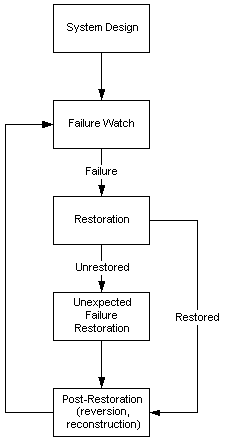
Figure
3 – Failure Restoration Flow Chart
5.2.5
Test
and Acceptance
5.2.6
Network
Recovery
5.2.7 Work Order Handling
5.2.8 Escalation Procedures
5.3
Configuration
Management
5.3.1
System
Turn-up
5.3.2
Network
Provisioning
5.3.2.1
Installation
of Solaris Operating System
Insert the Solaris 2.6 CD in the drive. At the boot prompt type boot. The following configuration settings need be
done for the installation setup. The
host name, ip address, subnet mask, default gateway, the nameserver setup and
search order, the time zone set to PDT, the power save mode set to be disabled
and permanently written to the configuration.
The disk shall be partitioned to have a 1GB root slice, 2 GB /opt slice,
2 GB /export slice, 1.5 GB / var slice and 2 GB swap space.
5.3.2.2
E450
Hardware Setup
The E450 houses a max of 4GB memory and 2
400MHz Sparc CPUs. We have a
configuration of 1 GB memory, 1 400MHz CPU, 4 9.1GB disk drives, 2 Fast
Ethernet adaptors and 2 differential SCSI adaptors. The unit at the business site is rack
mountable while the unit at the co-location site is set on shelves. The base unit comes with 1 Fast Ethernet
adaptor, 1 CPU and 512 MB memory.
Following the attached diagrams detailing
the specifications of the E450, remove the side panel to gain access to the PCI
bus. Install the differential SCSI
adaptors in Slots 1 and 2. The network
adaptors shall be in slot 4 and 5.
Install the memory SIMMs to a total of 1GB. After removing the plastic covers from the
SCSI port, install 2 hard disks in Slot 0 and 1 in the lower drive bay. Next install the other 2 hard drives in Slots
0 and 1 in the upper drive bay. Solaris
shall be installed the disk in Slot 0, lower bay and shall mirror using VM to
the disk in Slot 0, upper bay. The disk
in Slot1, lower bay shall contain 1 8.5 GB slice for housing the Oracle
binaries and shall mirror to the disk in Slot 1, upper bay.
<Insert diagram here>
5.3.2.3
E250
Hardware Setup
See 5.3.2.2 - E450
Hardware Setup
5.3.2.4
A1000
Hardware Setup
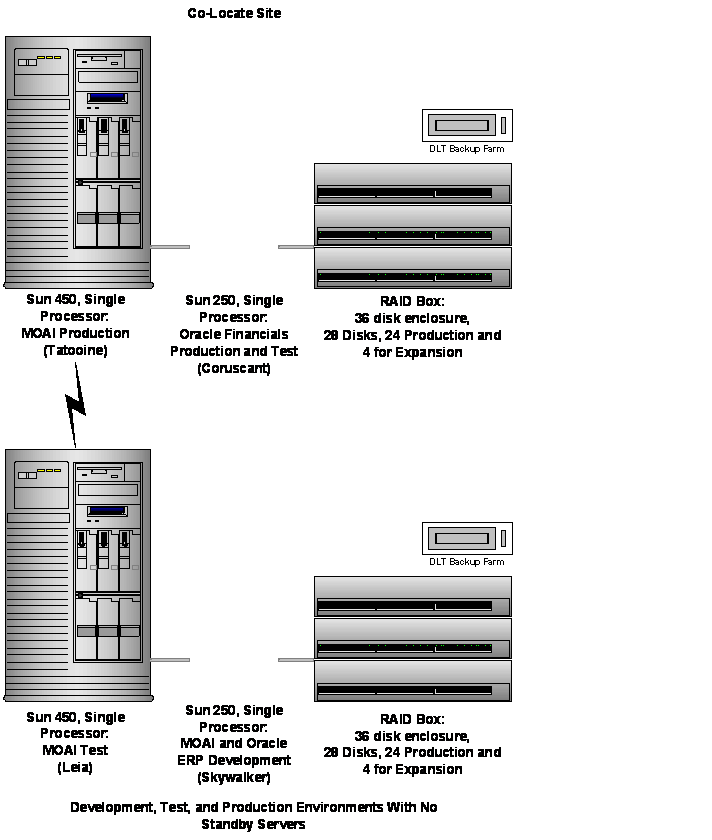
The A1000 is a single controller RAID unit
that can house 12 drives of a combination of 9.1GB, 18 GB or 36 GB drives. We have 12 - 9.1 GB drives. It has 2 drive groups with each drive group
comprising of 6 disks. They are referenced as [1,0], [1,1], [1,2], [1,3],
[1,4], [1,5] [2,0], [2,1], [2,2], [2,3], [2,4], [2,5]. [1,0], [1,1], [1,2], [1,3] are used for the
MOAI partition (sic); [2,0], [2,1],
[2,2], [2,3] are used for the Oracle partition (sic); [2,4], [2,5] are used for
the MOAI redo logs; [1,4] is used for the Oracle redo logs; [1,5] is the
designated hot spare disk.
Two A1000 units are setup with the above
configuration.
The
third A1000 is 10 - 9.1 GB disks. [1,5]
and [2,5] are empty and do not house a disk drive. [1,0], [1,1] and [1,2], [1,3] are setup as 2
LUNs for the image storage. [2,0],
[2,1], [2,2], [2,3] are setup as 4 LUNS and used as a scratchpad area. [1,4] and [2,4] are the designated hot
spares.
The first A1000 is labeled as the Eq_main
array, the second A1000 is labeled as Eq_mirror array and the third A100 is
labeled as Image array. The left SCSI
port of each A1000 is connected to the left port on the differential SCSI
adaptor in Slot 1 and Slot 2 in the E450 and E250. The right port on each A1000 is connected to
the left port on the differential SCSI adaptor in Slot1 and Slot 2. The left SCSI port of the third A1000 is
connected to the right port of the differential SCSI adaptor in Slot 1 in the
E450. The right SCSI port of the third
A1000 is connected to the right port of the differential SCSI adaptor in the
E250.
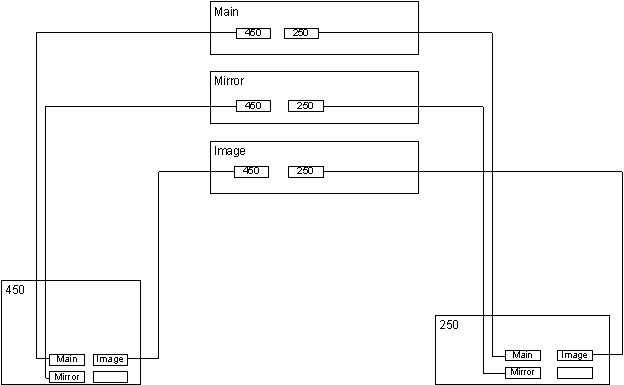
Figure 4 – SCSI Connections between 250, 450,
and A1000
RAID 0 configuration shall be setup to
provide stripping and VM shall be configured to provide mirroring.
5.3.2.5
Tape
Library (after test env. Stable)
5.3.2.6
File
System Layout And Sizes
5.3.2.7
Discuss
Vm Installation
5.3.2.8
Discuss
Vxfs Installation
5.3.2.9
Oracle
Installation
5.3.2.10
Live
Exchange Installation
Except
for the Oracle updates, login as root to perform these functions.
Note:
all LiveExchange files were owned by root with group other.
The goal is to change the protection on the 3
required directories to rw on world, permitting the developers to install their
own class files in the following directories:
/opt/LiveExchange_3.0/public_html/auction
/opt/LiveExchange_3.0/public_html/servletclasses
/opt/LiveExchange_3.0/server/classes/com/<defunct>
An initial test indicates that a developer
can own the class file and the system still works (i.e. it is probably not
necessary for the root user to own the class files).
Edit
properties files for LiveExchange
/opt/LiveExchange_3.0/ConfigServer/Properties/moai.properties
Change 1:
From:
#moai.liveexchange.msp.documentRoot=/opt/LiveExchange_3.0/public_html/C2C
To:
moai.liveexchange.msp.documentRoot=/opt/LiveExchange_3.0/public_html
Changes 2-6:
From:
#moai.liveexchange.msp.verbose=false
#moai.liveexchange.msp.develop=false
#moai.liveexchange.msp.keepGenerated=true
#moai.liveexchange.msp.debug=false
#moai.liveexchange.msp.useRealTimeApplet=false
To:
moai.liveexchange.msp.verbose=true
moai.liveexchange.msp.develop=true
moai.liveexchange.msp.keepGenerated=true
moai.liveexchange.msp.debug=true
??? check out
moai.liveexchange.msp.useRealTimeApplet=false
Change 7
??? check out
From:
moai.liveexchange.msp.pageCheckSeconds=10
To:
moai.liveexchange.msp.pageCheckSeconds=1
Notes: the current email addresses that will be formatted into system generated emails are:
moai.liveexchange.email.fromName=<defunct>@<defunct>.com
moai.liveexchange.email.fromAddress=<defunct>@<defunct>.com
/opt/LiveExchange_3.0/server/weblogic.properties
Changes 1-5:
weblogic.httpd.register.classes=weblogic.servlet.ClasspathServlet
#weblogic.httpd.register.classes=weblogic.servlet.ClasspathServlet
weblogic.allow.execute.weblogic.servlet.classes=everyone
#weblogic.allow.execute.weblogic.servlet.classes=everyone
weblogic.httpd.register.servlets=weblogic.servlet.ServletServlet
#weblogic.httpd.register.servlets=weblogic.servlet.ServletServlet
weblogic.httpd.servlet.classpath=/opt/LiveExchange_3.0/public_html/servletclasses
#weblogic.httpd.servlet.classpath=c:/myservlets
weblogic.httpd.servlet.reloadCheckSecs=1
#weblogic.httpd.servlet.reloadCheckSecs=10
Extract
source from VSS:
MSP
From <defunct>Development\Msp
Copy To:
/opt/LiveExchange_3.0/public_html/auction
Place top level page, index.msp in /opt/LiveExchange_3.0/public_html
Jar files
From <defunct>Development\lib
Placed in /export/home/projects/cots/jars
for compilation
Java – package com.<defunct>
From <defunct>Development\com
Copy To:
/export/home/projects
All .java files are compiled here and the
class files are directed to the directory /opt/LiveExchange_3.0/server/classes
Note:
The <defunct>.properties file that was checked into the
<defunct>Development/com/<defunct> directory must be copied to the
/opt/LiveExchange_3.0/server/classes/com/<defunct> directory. This file contains information that is set in
SiteMap.class.
Email Templates
From <defunct>Development\Email
Templates
Copy To:
/opt/LiveExchange_3.0/emailTemplates
Servlets
From
<defunct>Development\ServletClasses
All .java files are compiled and the class
files are directed to the directory
/opt/LiveExchange_3.0/public_html/servletclasses
Class
Builds:
The following sample make file makes the
class and puts the class file out to the correct directory, /opt/LiveExchange/server/classes/:
# makefile for setup
program
CL_DEST =
/opt/LiveExchange_3.0/server/classes
COTS_DIR =
/export/home/projects/cots/jars
SRCS = \
<defunct>User.java
OBJS = ${SRCS:.java=.class}
JAVAC = /usr/java1.2/bin/javac
JOPTS =
CP =
.:$(COTS_DIR)/servlet.jar:/opt/LiveExchange_3.0/server/weblogicaux.jar
:/opt/LiveExchange_3.0/server/classes
all: install
install: ${OBJS}
# Suffix rule for all java
files
.SUFFIXES : .java .class
.java.class:
${JAVAC} -classpath ${CP} -d $(CL_DEST) ${JOPTS} $<
Oracle
Updates:
Create file events.sql:
UPDATE MoaiOfferingFormat
SET
offeringEventAdapterClass =
‘com.<defunct>.event.<defunct>OfferingEventAdapter’
WHERE
MoaiOfferingFormat.name = ‘Fixed price’;
UPDATE MoaiOfferingFormat
SET
offeringEventAdapterClass =
‘com.<defunct>.event.<defunct>OfferingEventAdapter’
WHERE
MoaiOfferingFormat.name = ‘English’;
SELECT name, offeringEventAdapterClass FROM
MoaiOfferingFormat
WHERE
MoaiOfferingFormat.name = ‘Fixed price’
OR
MoaiOfferingFormat.name=’English’;
UPDATE MoaiConfigParam
SET
value = ‘com.<defunct>.event.<defunct>UserEventAdapter’
WHERE
MoaiConfigParam.name = ‘moai.liveexchange.server.UserEventAdapterClass’;
SELECT name, value FROM MoaiConfigParam
WHERE
MoaiConfigParam.name = ‘moai.liveexchange.server.UserEventAdapterClass’;
I created two files in
/export/home/oracle/wendy_sql to automate the oracle updates:
doit.sh and events.sql.
To run the
commands, do:
(a) Login as oracle user
(b) cd wendy_sql
Execute the commands one of the following
ways:
(1) Sqlplus madmin/madmin @events
or
(2) sh doit.sh
Starting
Up the LiveExchange Server:
The following line must be
added to the startup.sh file in the /opt/LiveExchange_3.0 directory:
export CLASSPATH=/usr/java1.2/jre/lib/rt.jar:/opt/LiveExchange_3.0/server/lib/we
blogicaux.jar:/opt/LiveExchange_3.0/server/classes:/opt/LiveExchange_3.0/server/
mssql4classes:/opt/LiveExchange_3.0/server/lib/activation.jar:/opt/LiveExchange_
3.0/server/lib/mail.jar:/opt/LiveExchange_3.0/server/lib/xml.jar
To start the server:
nohup ./startup.sh &
Stopping
the LiveExchange Server:
ps –ef | grep jre
The command line looks like /…./jre ….
???
Find the process id and
Kill –9 ‘pid’
Moai Email:
Standard email subject fields can be changed
through the admin tool. No changes have
been made to date.
5.3.2.10.1
How to
start MOAI LiveExchange
MOAI LiveExchange is the auction software we
use at <defunct>.com. We run three primary systems: Development, Test,
and Production. The passwords needed to log in to the three systems differ, but
the process for starting and stopping the software is the same for all three
platforms.
To start the MOAI LiveExchange server, do
the following:
·
Log
in to the system as the user 'moai':
·
login:
moai
·
Password:
This login should drop you directly into the
home directory used by the LiveExchange software. You can confirm this:
$ pwd
/opt/LiveExchange_3.0
Review
the settings for the file named moai.server:
# ls -l moai.server
-rwxr--r-- 1 root
sys 3594 Mar 14 16:50
moai.server
·
If
you head this file, you will note the following comment:
$ head moai.server
#!/bin/sh
# ----------------------------------------------------------------------------
# $ Header: $
# ----------------------------------------------------------------------------
#
# moai.server
#
# Start / stop / restart the MOAI LiveExchange server
#
# This file should have uid root, gid sys and chmod 744
$
 If these settings are not made the server will
not be able to run on port 80, the default port for the http protocol.
If these settings are not made the server will
not be able to run on port 80, the default port for the http protocol.
Become the super user:
$ su root
Password:
#
If the server is already running, shut it down:
# ./moai.server stop
It sometimes happens that this attempt to shut
down the system fails. [CLM Note: show an example of this by forcing an error]
If this happens, you must kill the process. To do this, find the running Java
Virtual Machine and kill it:
# ps -ef | grep java
root 751 690 0 Jan 24 ? 2:22 jre -nojit -noasyncgc -cp /opt/VRTSvmsa/vmsa/java -Dvrts.codebase=/opt/VRTSvmsa
root 780 690 0 Jan 24 ? 44:03 jre -nojit -noasyncgc -cp /opt/VRTSvmsa/vmsa/java -Dvrts.packageName=SOL -Dvrts
root 18273 18104 0 10:37:41 pts/5 0:00 grep java
moai 27522 1 0 Mar 31 ? 9:55 /opt/LiveExchange_3.0/server/jdk/bin/../bin/sparc/native_threads/java -classpat
#
The process you are looking for is the one that
starts with /opt/LiveExchange, in the example above it is process ID 27522.
Issue the command
kill 27522
That should remove the process.
Start the LiveExchange server:
# nohup ./moai.server start
#
It is very important to use nohup when starting
the server. If you do not do this, the process will end as soon as you close
the window in which you started it.
5.3.2.11
Network
Peripherals Setup
5.3.2.12
Router
Setup on Business Site
5.3.2.13
Router
Setup on Pt To Pt Between Co-Lo and Business Sites
5.3.2.14
Router
Setup on Pt To Pt Between Co-Lo and Abovenet
5.3.2.15
Router
Setup on Connection To Isp
5.3.2.16
Static
Routes Between Co-Lo And Business Sites
5.3.2.17
Switch
Setup And Configuration
5.3.2.18
Firewall
Setup And Configuration For Business Site And Co-Lo Sites
5.3.2.19
Business
Site Vpn Setup
5.3.2.20
Partner
Access Vpn Setup
5.3.2.21
Remote
Admin Of Co-Lo Site Firewall By Business Site Firewall
5.3.2.22
Business
Email Setup and Configuration
5.3.2.22.1
Install
Exchange Server 5.0
Execute startup from Exchange Server
CD.
When the setup dialog appears, select the Complete/Custom button.
When the Complete/Custom dialog
appears, check box all options and press Continue.
When the CD-Key dialog appears, enter
the CD Key. Press OK when done.
When the Licensing Mode dialog
appears, select the Per Seat radio
button, press Continue.
Select Create a new site radio button.
Complete the fields for Organization
Name and Site Name. Enter <defunct>.com and DARKSIDE,
respectivily.
Enter the account password for the Exchange
Administrator, and then select OK.
Files and services will now be copied to the
system. Registry changes will also be
made. This should take about 8 minutes
before the completion dialog appears.
You are presented with two choices: Run Optimizer and Exit
Setup. Choose Exit Setup.
Next, update Exchange with Exchange Service
Pack 2. This should take about 5
minutes.
Next, run Optimizer from the Exchange
program menu.
When the Performance Optimizer dialog
appears, check box 101-250 Users on this server, Private Store, Public
Store, Multiserver, and 100-999 Users in organization. All other boxes are either blank or 0. Select Next.
When the next Performance Optimizer dialog
appears, you will be asked to designate the files locations for the
server. Change all logs and databases to
the D: drive in the same recommended directory.
The next Performance Optimizer dialog
allows you to restart the services.
Check box the Do not restart these services then select Finished.
Open the Control Panel and select Services. Select each of the following services in
turn, click on Startup, and change the Startup Type to Automatic:
·
Microsoft Exchange Directory
· Microsoft Exchange Information Store
· Microsoft Exchange Message Transfer Agent
·
Microsoft Exchange System Attendant
Install Internet Mail Service.
From MS Exchange Administrator, select File
| New Other | Internet Mail Service.
·
Choose appropriate machine on which to install
the Service (EXSERVER).
· Choose “Route all mail through a single host”.
· Allow all Internet addresses (typical).
· Choose appropriate mail extension (@<defunct>.com).
· Disable Circular logging.
On Internet Mail Service connector,
under Properties:
·
General Tab:
computername = EXSERVER
· Connected Sites Tab: nothing to enter
· Address Space Tab: Type: SMTP Cost=1
· Delivery Restrictions Tab: Accept from all; reject from none.
· Diagnostic logging tab for MS Exchange IMC service: SMTP interface events to minimum; all others none.
· Internet Mail Tab: admin mailbox=administrator; send attachments using plain text MIME; char set=MIME/Western Euro non-MIME=US ASCII
· Dial Up Connections Tab: nothing to enter
· Queues Tab: nothing to enter
· Routing tab: reroute incoming SMTP mail-mail sent to <defunct>.com. route to inbound
· Security Tab: nothing to enter
· Connection Tab: transfer mode=inbound and outbound; advanced button=take default.
5.3.2.22.2
Disaster
and Recovery Planning
This section defines
transaction logs and checkpoint files and their respective roles in backup and
recovery, circular logging, and transaction logs in playback. First, the
Exchange client sends a message to the server, the server receives it, executes
transactions that must take place in memory, and almost instantly writes those
transactions to a log file. After a certain interval, the transaction is
written out through the information store or the database file, the PRIV.EDB or
the PUB.EDB.
In other words, for
performance and reliability reasons, the transactions are written to the
sequential log files first and then to the database files. This means that for
every transaction written out to your database file, there is a copy in a log
file, which can be played back into your database file in case of a crash.
That’s the key benefit of transaction logging.
One useful
characteristic of an Exchange Server transaction log is its size: whether full
or empty, it usually is 5 MB. Therefore, if you see a log file of some other
size, you can assume it is corrupt. The current transaction log is always
called EDB.LOG. When it is filled, it is
renamed to edb0001.log, EDB0002.LOG...,
and a new EDB.LOG is created. In addition, each transaction-log file contains a
signature that must match the signature of the corresponding database file. If
these signatures do not match, the corresponding service fails on startup and
the event log contains a Jet-level error message, indicating an invalid log
signature or an invalid database signature.
The checkpoint file
is an optimization, enabling the service to track which transactions have and
have not been committed to the database. This file is called EDB.CHK, and for
the directory service, it resides in the DSADATA directory. For the information store service, it resides
in the MDBDATA directory. Again, if you
run performance optimizer, the location of this file may vary. Every time you
commit a transaction to the database file, the checkpoint file is updated.
Circular logging is a very important
concept for disaster recovery. When circular logging is turned on, it saves
storage by preventing the continuous buildup of transaction-log files on your
drive. The downside, of course, is that with circular logging, incremental and
differential backups do not occur and, therefore, are not available in case of
a crash. Note that circular logging is the default setting in Exchange. If you do not want it, you can turn it off
through the admin program.
Here’s how these
transaction-log files and checkpoint files work for recovery. With all your
transactions in a transaction-log file and the checkpoint file indicating what
transactions have been committed to the database, the service scans the
checkpoint files to find the last transaction committed to the database. The
service then scans the transaction logs to find the transactions that are not
yet committed to the database and writes them to it. This process occurs
automatically when you start the service or when you’ve restored an online
backup.
Microsoft Exchange
classifies backups as either online or offline. An online backup
is made while the Exchange services are running. To back up the data while the
services are running, you need an Exchange-aware backup program, such as
NETBACKUP. Such program back up data logically, that is, all the data related
to the information store and all the data related to the directory service.
Off Line Backup
An offline backup is
a normal file-level backup made with services stopped. Any backup software can
perform an offline backup. However, when you restore, an offline backup does
not automatically play through the log files, as does its online counterpart.
For this reason, Microsoft does not recommend an offline backup for daily
backups. Nonetheless, an offline backup is essential when online backups fail.
Exchange supports
four kinds of online backups: normal or full, copy, incremental, and
differential. A normal backup backs up your database files and then the
transaction-log files; then it deletes the transaction-log files from the
directory. This means you can have circular logging disabled, because your
backup software deletes the log files. So if you’re performing regular backups,
you won’t have a problem with log files filling up your drive. To restore a
normal backup, you need only restore your last normal backup set and start the
service.
A copy backup is similar to a
normal backup except that it doesn’t purge the log files on your drive and
doesn’t update the backup context in the database files. Thus, it is practical
when you don’t want to disturb your normal backup schedule, but you do want to
back up your data.
An incremental
backup works only on the log files and, thus, only when
circular logging is disabled. Like a normal backup, incremental backup also
purges log files after backing them up. So it provides yet another way to rid
log files from your drive without compromising recoverability. To restore an
incremental backup, you must return to your last normal backup set, which
contains your database files. Restore those database files, restore every
incremental backup set made after the normal backup, and then start the
service. Note that you should not start the service until you have restored all
the backup sets. Otherwise, any logs
restored after the backup set will not be played forward.
Like an incremental
backup, a differential backup also works on log files, so to use it, you
must have circular logging disabled. Unlike an incremental backup, however, a
differential backup does not delete the log files. To restore a differential backup
set, return to the last normal backup and restore your differential backup set,
which contains the entire log files generated after your last normal backup. As
with incremental backup, do not start the service until you have restored all
the backup sets.
* Online backup is
being implemented on the EXSERVER. A normal backup is done on Friday and a
differential backup Monday through Thursday.
Exchange Server
5.5 Editions
Exchange Server 5.5 comes in two editions, Standard and
·
Exchange Server 5.5
· 16GigaByte database limitation
· Microsoft Outlook® 2000 client
· Microsoft Mail Connector
· Internet Mail Service (formerly Internet Mail Connector)
· cc:Mail Connector
· Exchange Connector
· Notes Connector
· Active Server Components (formerly Web X)
· Internet News Service (formerly NNTP)
· Microsoft Visual InterDev® integrated Web application development system
·
An
Exchange Server 5.5 Enterprise Edition contains the same components as
Standard Edition, plus:
·
Unlimited storage
· X.400 Connector
· IBM OfficeVision/VM/SNADS Connectors (requires Microsoft SNA Server)
· Microsoft Cluster Server support (requires Microsoft Windows NT® Enterprise Edition).
To migrate from a standard edition to an
Pricing and
Licensing Offers
A Server License is required for each installed server product. The Server
License grants the customer the right to run Microsoft server software on a
single server (for this purpose, a server is defined as having up to four
processors). This license may be purchased through full package products,
Microsoft License Packs, the Microsoft Open License program, or the Microsoft
Select program.
Microsoft Exchange Client Access Licenses
(CALs) are required for any client software or application to connect to a
Microsoft Exchange Server. CALs can be purchased for either five or 20 clients
to access the services of Exchange Server. This license is not included with
Microsoft Windows® 95 or Microsoft Office 97. Microsoft Exchange
Client Access License Upgrade with 25 CALs is also available. This package is
for customers who wish to upgrade their CALs from Microsoft Mail or from any
competitor product to Exchange Server 5.5. It includes 25 CALs.
* Currently we have 100 CALs on our EXSERVER.
|
Full Product Offers |
Part Number |
Estimated Price |
|
Exchange Server Standard Edition with Five
Client Access Licenses (CALs) |
312-01070 Replaces: 312-00690 |
999.00 |
|
Exchange Server Standard Edition with 25
CALs |
312-01072 Replaces: 312-00691 |
2,129.00 |
|
Exchange Server Enterprise Edition with 25
CALs |
395-01326 Replaces: 395-00955 |
3,549.00 |
|
Exchange Server Enterprise Edition with 50
CALs |
395-01327 Replaces: 395-00957 |
4,859.00 |
|
Client Access License with Five CALs |
381-00852 Replaces: 381-00297 |
369.00 |
|
Client Access License with 20 CALs |
381-00850 Replaces: 381-00295 |
1,149.00 |
|
Microsoft Exchange X.400 Connector |
396-00123 Replaces: 312-874v400 |
999.00 |
5.3.3 Auto-discovery
<xxx
tbd>
5.3.4 Backup and Restore
A sun netra t1 server chewy acts as
the netbackup master server with tatooine, coruscant, naboo, ots0
and ots1 as clients. Two sets of
5 tapes are maintained. One set is used
for incremental backups. The second set
is used each Saturday for full backups.
Every week, we shall test the quality of the backups by executing a
restore in a test area.
The tape array unit is an ATL Powerstor 200
model with 1 DLT 4000 tape drive and 8 cartridge drives. It has a single ended SCSI adaptor and shall
be connected to the netra. Tatooine has
a total of 89GB. This will fit in 3 DLT
tapes with compression enabled.
A netbackup class shall be created to do a
complete backup. Oracle database
extensions shall backup onto a separate tape.
Oracle hotbackups shall be written to /work/backup and the remote copied
to the business site which will be indexed for 1 week.
Daily data backups shall be performed by
automated tape backup equipment attached to the application servers. Automated tape backup shall be performed on
both the co-location application server and the business application server
using separate tape backup equipment.
These tapes shall be retrieved from the tape unit every seven days and
stored in a fireproof safe. New, pre-formatted tapes shall replace the retrieved
tapes. One year of tapes shall be retained.
The incremental tape backup method shall be
used for each backup day. Each night, a
complete hot backup is taken of all tablespace datafiles, archived redo logs,
and the control file. All files are
compressed to save space. In addition to
the hot backups, full database exports are run following each hot backup. The full database exports are supplemental
backup protection and enable the databases to be reconstructed. These files are written to a work area on
each server and then backed up by the system administrator to tape.
Although many non 7 x 24 firms use
incremental backups of the Oracle datafiles, such a strategy is inappropriate
for the Production instances at <defunct>.com, due to the increased time of
recovery and the extra downtime. We must
be able to restore the files as quickly as possible, without the need to switch
tapes and apply incremental backups.
Restoring datafiles from incremental backups would add many hours to the
database recovery time.
It is appropriate, however, to perform a
weekly backup of the mount point for the each database. Backing up from the point mount captures both
the Oracle binaries and the datafiles.
Therefore, each week, a complete backup will be taken of the entire
mount point for all Oracle databases, with the exception of the Vision database
on Coruscant. (Vision in an example ERP
database that is only run periodically).
If the time required to do the full weekly
backups becomes excessive for any one day, the full backups of the mount points
will be rotated during the week to reduce the time required on any day to do
full backups. For example, the mount
point backup of Moai Production could be performed on Sunday, while Oracle ERP
Production could be performed on Monday.
These backup procedures are for the
short-term, and will be replaced with Veritas NetBackup and Oracle Recovery
Manager. Eventually, in Phase II, as
transactions pick up and downtime becomes even more expensive, a weeks worth of
the full mount point backups and the daily hot backups of tablespace datafiles,
archived redo logs, and the control files could be stored on disk (in addition
to tape) so that most recoveries can take place without the time required to
restore from tape.
Once per month, a full database backup shall
be performed and kept with the tape backup library. Data recovery shall be tested on each tape unit once per week, according to
configuration management policy currently in effect. Data recovery shall be tested once per month.
5.3.4.1
Overview of Oracle Backup and Recovery
When the archivelog feature of Oracle is
enabled, the database makes a copy of every online redo log after that log
fills, so data recovery can occur to the point in time of database
failure.
A clear distinction needs to be drawn
between transactions and databases. A
transaction in Oracle is made permanent with the commit statement, while
transactions are undone with the rollback statement. Some people believe you can do something
similar to a database. You can rollback
a transaction, but no such commands exist for “rolling back” a database.
In order for an archived recovery to occur,
a copy of the operating system files that comprise the database at a prior
point in time must first be available.
Then, from those files, commands are issued to recover the
database. The archived logs are
typically applied to the database until the last committed transaction. Recoveries prior to the last transaction are
called “point in time” recoveries and must go through a similar process for
recovery.
A mount point recovery typically is needed
when the Oracle binary files become corrupted, an applied binary patch needs to
be undone, or other similar file is lost.
Copies of the archived redo logs must be
available for an archived recovery to occur and must be backed up by the system
administrator as described previously.
If no backup occurs, the database cannot be recovered from archived
logs.
Every tape will be clearly labeled with the
date of the backup. If the tape is for a
special backup, it will be clearly labeled as such and must be removed from the
tape queue and replaced with another blank tape. Otherwise, the backup that night will
overwrite the special backup.
Procedures
and Commands
The detailed commands and procedures to
recover a database depend on the circumstances of the problem and are beyond
the scope of the document. The
procedures are described in the Oracle8 Backup and Recovery Guide. When Veritas is implemented, a series of
scripts will be designed to facilitate typical problems.
Database Directories
The following
directories (and below) should be backed up nightly:
On Tatooine:
/u07/oradata
/work02/exports
On Leai:
/u05/oradata
/work02/exports
On Skywalker:
/u03/oradata
/work01/exports
On Coruscant:
/u02/app/oraprd/admin/PRD/arch
/work/backup
The following
directories (and below) should be backed up weekly:
On Tatooine:
/var/opt/oracle
/u01/app/oracle
On Leai:
/var/opt/oracle
/u01/app/oracle
On Skywalker:
/var/opt/oracle
/u01/app/oracle
On Coruscant:
/var/opt/oracle
/u02/app
/u03/app
/u04/app
This list does
not include the Oracle "datafiles" which are associated with database
tablespaces. Please also note, occasionally there will be
special tapes that you must keep longer -- for instance, the two sets you are
keeping for us to restore /u03 and /u04 on Coruscant (Oracle Financials,
The backup start times are as follows:
On Tatooine: 2AM
On Leai: 2AM
On Skywalker: 2AM
On Coruscant: 11PM
5.3.4.2
Overview
of MS SQL Backup and Recovery (Octane)
The backup process for the MS SQL Server
databases is automated from the database perspective.
On both ots0 and ots1 we have established
"Maintenance Plans" within SQL Server. The Maintenance Plans automate three
functions, as follows: 1) integrity checking, 2) database compression, and 3)
backup to disk. These are timed daily at
12:01 AM, 12:06 AM and 12:11 AM, respectively.
The third step should always be complete by 12:30 AM.
We have created "at jobs" on both
boxes to fire at 2 AM daily. These jobs
execute the script named "backup_mssql_ots0.bat" and
"backup_mssql_ots1.bat", respectively. Two additional batch files have been written
to re-create the "at jobs" should they accidentially get
deleted. These scripts are named
"at_backup_ots0.bat" and "at_backup_ots1.bat". These scripts should not be re-run if the
"at jobs" are present. All
four files have been tested extensively and stored in VSS.
The compressed files, octane-yyyymmdd.zip,
are left in e:\mssql7\backup on each server.
They are transferred to the ftp server on
The scripts may be viewed in VSS or on the server
in e:\mssql7\backup.
The automation of sending a copy of the
octane database (only) to Service uses the same technique as described above
but the target ftp server is camserver.
Service retrieves their copy every Monday morning. An FTP account id of: service, has been set
up for their use.
There is an "at command" on my
box,
at_tucson.bat
The "at command" executes the
following script on Monday mornings at 7 AM:
i:\ftproot\service\tucson_to_service.bat
This batch file takes the Monday .zip file,
which was placed on
We are currently putting these files
(octane-2000xxxx.zip, and "noerrors") in the "incoming"
directory. I can not view the files; but
after testing the second time I see that I get the message "permission
denied on server (overwrite)", so I assume I have made the connection
properly.
When the new directory, with permissions for
Service, is created we will change the script.
The "at command" is currently set and ready to go. Files are stored in VSS for your review.
The compressed files should still be backed
up to tape and maintained per the O&M procedures. The database backups have been tested on my
machine; but it should be noted that "full-text search" capabilities
couldn’t be implemented on an NT Workstation, so we still don't have a 100%
test of these files.
You really can't back up a database while
its' operational. To back up the files
"cold" the database "service" must be stopped; but to
really be sure you're backed up, you must export, backup, dump, unload, etc.
the files... depending on the vendor.
With MS it's "backup".
We do not backup the "system" database, as they would be recovered
with a rebuild from CDROM. And the
"automation" features of MS SQL Server do not function as advertised.
5.3.5 Database Handling
5.3.5.1
Monitoring
There is a crontab entry on Skywalker, Leia,
Coruscant, and Tatooine that runs six times a day at the following times: 3:45,
7:45, 11:45 AM and PM, seven days a week.
It executes a Unix shell script on each box that creates a number of
HTML files that are then downloaded to the PC at David Russell’s desk. There is an FTP server on this PC to receive
the files, as well as a web server to publish them.
Access it at the following URL http://tucson/oralogs/.
You can review Oracle related information
about disks, processes, logs, etc.
Later, it will also report on backup completion status. (Sri, I’m
waiting for information on this. John, this will change when we implement
Oracle Recovery Manager (RMAN)).
The Oracle Financial instances are not
totally supported by this tool. There
are a number of issues with the “listeners” on the Oracle applications.
As the Oracle DBA, it's my default
page. It is monitored several times a
day, and when I’m called in during the night, it’s the first thing I go for to
see what’s happening with a troubled machine.
Note: I hope that the FTP server and access
to these files can be accomplished on my home machine, too. Total configuration of that environment needs
to be done, time permitting.
5.3.5.2
Maintenance
TBD, at a minimum, init<sid>.ora files
need to be hard-copies here…
Plus UNIX (/ext/system) semaphores settings…
(Or, we could reference a copy in the
Technical Reference Manuals.)
5.3.5.3
Tuning
TBD
5.3.5.4
Support
<snip>
5.3.5.5
Database
Configuration (Moai Instances)
The following Oracle parameters are
identical on each of our Moai Oracle instances. The ones that are unique, per
instance, follow in a separate section. This list does not necessarily
represent non-default values. There are
additional Oracle parameters that default to known values and are occasionally
changed.
The best place to view these parameters, per
instance, is within the Oracle directory structure at
$ORACLE_BASE/admin/<SID>/pfile/init<SID>.ora If an instances is running, the best way to
get the values is to query the database (svrmgrl: show parameters).
Oracle Financial settings will appear
separately... (TDB). They can be viewed in $ORACLE_HOME/dbs/init<SID>.ora
(note the different location).
db_domain = <defunct>.com
db_block_buffers = 8192
shared_pool_size = 52428800
java_pool_size = 20971520
log_checkpoint_interval = 10000
log_checkpoint_timeout = 1800
processes = 200
log_buffer = 163840
log_archive_start = true
log_archive_format = %t_%s.dbf
rollback_segments = (r01, r02, r03, r04)
global_names = true
db_block_size = 8192
remote_login_passwordfile = exclusive
os_authent_prefix = ""
job_queue_processes = 0
job_queue_interval = 60
distributed_transactions = 10
open_links = 4
mts_dispatchers = "(PROTOCOL=TCP)(PRE=oracle.aurora.server.SGiopServer)"
mts_servers = 1
compatible = "8.1.0"
nls_date_format = DD-MON-RRRR
nls_numeric_characters = ".,"
nls_sort = binary
nls_language = AMERICAN
nls_territory
=
initMOAIDEV.ora settings unique to MOAIDEV (Skywalker)
db_name = MOAIDEV
instance_name = MOAIDEV
service_names = MOAIDEV.<defunct>.com
control_files = ("/u02/oradata/MOAIDEV/control01.ctl", "/u02/oradata/MOAIDEV/control02.ctl")
log_archive_dest_1 = "location=/u03/oradata/MOAIDEV/arch"
background_dump_dest = /u01/app/oracle/admin/MOAIDEV/bdump
core_dump_dest = /u01/app/oracle/admin/MOAIDEV/cdump
user_dump_dest = /u01/app/oracle/admin/MOAIDEV/udump
initMOAITST.ora settings unique to MOAITST (Leia)
db_name = MOAITST
instance_name = MOAITST
service_names = MOAITST.<defunct>.com
control_files = ("/u04/oradata/MOAITST/control01.ctl", "/u04/oradata/MOAITST/control02.ctl")
log_archive_dest_1 = "location=/u05/oradata/MOAITST/arch"
background_dump_dest = /u01/app/oracle/admin/MOAITST/bdump
core_dump_dest = /u01/app/oracle/admin/MOAITST/cdump
user_dump_dest = /u01/app/oracle/admin/MOAITST/udump
initMOAIPROD.ora settings unique to MOAIPROD (Tatooine)
db_name = MOAIPROD
instance_name = MOAIPROD
service_names = MOAIPROD.<defunct>.com
control_files = ("/u06/oradata/MOAIPROD/control01.ctl", "/u06/oradata/MOAIPROD/control02.ctl")
log_archive_dest_1 = "location=/u07/oradata/MOAIPROD/arch"
background_dump_dest = /u01/app/oracle/admin/MOAIPROD/bdump
core_dump_dest = /u01/app/oracle/admin/MOAIPROD/cdump
user_dump_dest = /u01/app/oracle/admin/MOAIPROD/udump
5.3.5.6
Oracle
Net8 Configuration
The Oracle Net8 configuration requires three
files to be located at /var/opt/oracle: listener.ora, sqlnet.ora, and
tnsnames.ora. They are slightly
different on each platform. They are all
included here in case something happens to the disk copies.
<one for each host – duplicated omitted
here>
Listener.ora
LISTENER =
(DESCRIPTION_LIST =
(DESCRIPTION =
(ADDRESS_LIST =
(ADDRESS = (PROTOCOL = IPC)(KEY =
EXTPROC0))
)
(ADDRESS_LIST =
(ADDRESS = (PROTOCOL = TCP)(HOST =
skywalker)(PORT = 1521))
)
)
(DESCRIPTION =
(PROTOCOL_STACK =
(PRESENTATION = GIOP)
(SESSION = RAW)
)
(ADDRESS = (PROTOCOL = TCP)(HOST =
skywalker)(PORT = 2481))
)
)
SID_LIST_LISTENER =
(SID_LIST =
(SID_DESC =
(SID_NAME = PLSExtProc)
(ORACLE_HOME =
/u01/app/oracle/product/8.1.5)
(PROGRAM = extproc)
)
(SID_DESC =
(GLOBAL_DBNAME =
moaidev.<defunct>.com)
(ORACLE_HOME =
/u01/app/oracle/product/8.1.5)
(SID_NAME = MOAIDEV)
)
(SID_DESC =
(GLOBAL_DBNAME =
moaiclon.<defunct>.com)
(ORACLE_HOME =
/u01/app/oracle/product/8.1.5)
(SID_NAME = MOAICLON)
)
)
Sqlnet.ora
SQLNET.AUTHENTICATION_SERVICES =
(NONE)
AUTOMATIC_IPC = OFF
USE_DEDICATED_SERVER = OFF
NAMES.DEFAULT_DOMAIN =
<DEFUNCT>.COM
NAMES.DIRECTORY_PATH = (TNSNAMES)
SQLNET.EXPIRE_TIME = 0
Tnsnames.ora
EXTPROC_CONNECTION_DATA =
(DESCRIPTION =
(ADDRESS_LIST =
(ADDRESS = (PROTOCOL = IPC)(KEY =
EXTPROC0))
)
(CONNECT_DATA =
(SID = PLSExtProc)
(PRESENTATION = RO)
)
)
BEQ-LOCAL.<DEFUNCT>.COM
(DESCRIPTION =
(ADDRESS_LIST =
(ADDRESS = (PROTOCOL = BEQ) (PROGRAM =
oracle)
(ARGV0 = MOAIDEV)
(ARGS =
'(DESCRIPTION=(LOCAL=YES)(ADDRESS=(PROTOCOL=beq)))')
)
)
(CONNECT_DATA = (SID = MOAIDEV)
)
)
BEQ-LOCAL.<DEFUNCT>.COM
(DESCRIPTION =
(ADDRESS_LIST =
(ADDRESS = (PROTOCOL = BEQ) (PROGRAM =
oracle)
(ARGV0 = MOAICLON)
(ARGS =
'(DESCRIPTION=(LOCAL=YES)(ADDRESS=(PROTOCOL=beq)))')
)
)
(CONNECT_DATA = (SID = MOAICLON)
)
)
MOAICLON =
(DESCRIPTION =
(ADDRESS_LIST =
(ADDRESS = (PROTOCOL = TCP)(HOST =
skywalker)(PORT = 1521))
)
(CONNECT_DATA =
(SERVICE_NAME =
moaiclon.<defunct>.com)
)
)
MOAITST =
(DESCRIPTION =
(ADDRESS_LIST =
(ADDRESS = (PROTOCOL = TCP)(HOST =
leia)(PORT = 1521))
)
(CONNECT_DATA =
(SERVICE_NAME =
moaitst.<defunct>.com)
)
)
MOAIDEV =
(DESCRIPTION =
(ADDRESS_LIST =
(ADDRESS = (PROTOCOL = TCP)(HOST =
skywalker)(PORT = 1521))
)
(CONNECT_DATA =
(SERVICE_NAME =
moaidev.<defunct>.com)
)
)
<snip>
5.3.5.7
Other
Issues
TBD
5.3.6
Availability
Of Spare Parts
Availability Of
Spare Parts maintains
hardware as part of the contingency plan.
A router specified for connection to AboveNet is unused and can serve as
a spare router. Two spare NIC cards are
maintained. Spare cables are available
from SimpleNet. Each A1000 unit has a hot spare disk. Sun Monitor and keyboard and a NT monitor and
keyboard are available from SimpleNet.
5.3.7
Corrective
Maintenance
SimpleNet provides a service – to ping the
website address of www.<defunct>.com. A failure of a successful ping shall trigger
a page to the pager carried by <snip> in that order. The engineer who receives the page shall
remote access the business site VPN and then access the network management
application to perform fact finding. The
remote access equipment shall consist of a laptop with regular and cell modem
capabilities. Once the fact finding
process has been completed, the engineer shall make a determination as to the
possible cause of the problem. The
appropriate vendor shall be contacted using the Support Contract number for
<defunct>.com. The vendor contact numbers and our support contract or
reference numbers shall be obtained from the Vendor Contacts Section.
5.3.8
Preventative
Maintenance
cronjobs
monitor disk usage and file system space.
Oracle log and temporary files deleted weekly. SNMP agents are enabled in the A1000, E250,
E450, the Ultra-10 running the FW and the Ultra-10 running the Accrue
Analyzer. All the data shall be captured
by Network Management Software, HP Open View.
5.3.9 Change Requests
All change requests, maintenance and
upgrades shall be documented by a rfc.
5.3.10
Change Control
5.4
Accounting Management
5.4.1
Track Service Usage
5.4.2
Monitor Service Quality Trends
5.4.3
Supply
of Statistical Information as a Basis for Expansion
SAS
5.5
Performance
Management
5.5.1
Data
Collection
Monitor
Service Quality Trends
5.5.2
Report
Generation
5.5.3
Data
Analysis
5.6
Security
Management
Oracle here
Octane here, too
TBD
Absolutely will want to cover many issues…
all those accounts with default passwords, and other holes.
No account can have default passwords.
SQL*Server default “sa” password
5.6.1
Control Network Element Access
5.6.2 Enable Network Element Functions
5.6.3 Access Logs
6.
References
[1] <defunct>.com Web Design
And Layout, <defunct>\Mock.Html, Version 4.0, 9/8/99. (Jeremy)
[2] Use Case Diagrams, Uc-1-N.Vsd,
9/9/99. (Scott)
[3] White Paper, Technology Analysis
and Recommendations, White Paper.doc, 9/30/99. (Terry)
[4] <defunct>.com
Website Functional Specifications, Functional Specifications.doc, Rev 1.7
10/13/99. (Terry)
[5] Engineering Schedule, <defunct> Engineering Revised
Schedule2.mpp, 11/20/99. (Renee)
[6] Network Management, Network Management.doc, 5/95. (Douglas
Stevenson)